The Early Access for EA Sports FC 25 is just around the corner. For those who pre-ordered the Ultimate digital version on Xbox Series X/S and Xbox One, you can even start playing a few hours early by using a New Zealand Setting.
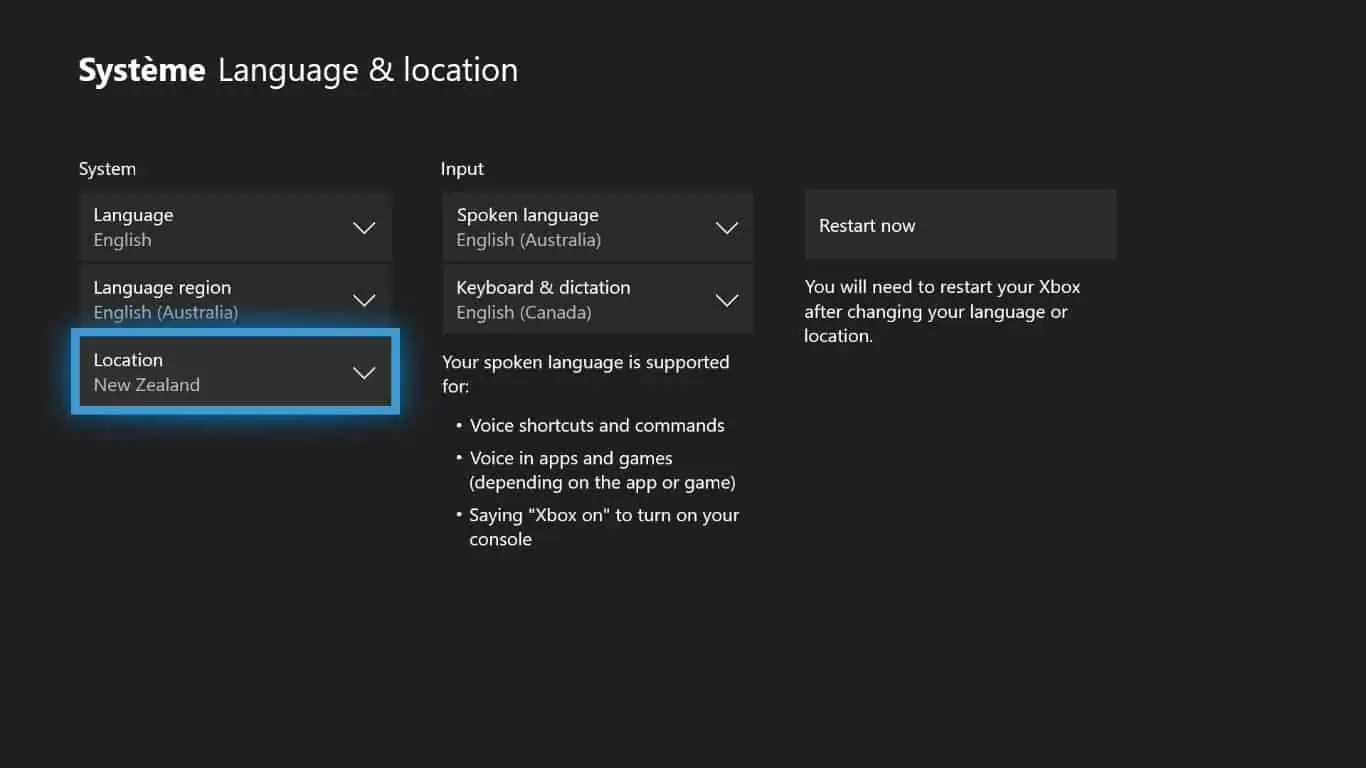
Below is a guide to unlocking EA Sports FC 25 in advance. By selecting English as the language and using the New Zealand location in the console’s settings, you can unlock the new chapter of the Canadian software house’s football simulator several hours earlier (around 1:00 PM UK time on 19th September) than the scheduled release for Europe.
Once you’ve changed your location, all you need to do is restart your console and launch the game. Currently, the same method doesn’t seem to work on other platforms like PlayStation 5, PlayStation 4, and PC.
The availability time would be midnight between 19th and 20th September in New Zealand, corresponding to 1:00 PM UK Time.
While waiting for the official release of the new football simulation game, if you’re a fan of the popular Ultimate Team mode—whether you’re an experienced player or a first-timer—you can easily earn coins for EA FC 25’s Ultimate Team mode by checking out the guide. It offers plenty of useful tips and explains how to accumulate Coins quickly by taking advantage of early access through the Web App and Companion App.
In anticipation of gamers employing this cunning strategy once again this year, we’ve included a guide to assist you in correctly configuring your Xbox for early access to EA SPORTS FC 25.
Potrebbero Interessarti

Step 1: Pre-Order EA FC 25 Ultimate Edition
To kickstart your early access journey, you’ll need to pre-order the EA Sports FC 25 Ultimate Edition. This version grants you early access to the game. Ensure you’ve completed this step before moving on.
Step 2: Configure Your Xbox Settings
- Set Language to English (Australia): EA SPORTS FC 25’s early access is often linked to the English (Australia) language setting. Make sure your Xbox is set to this language.
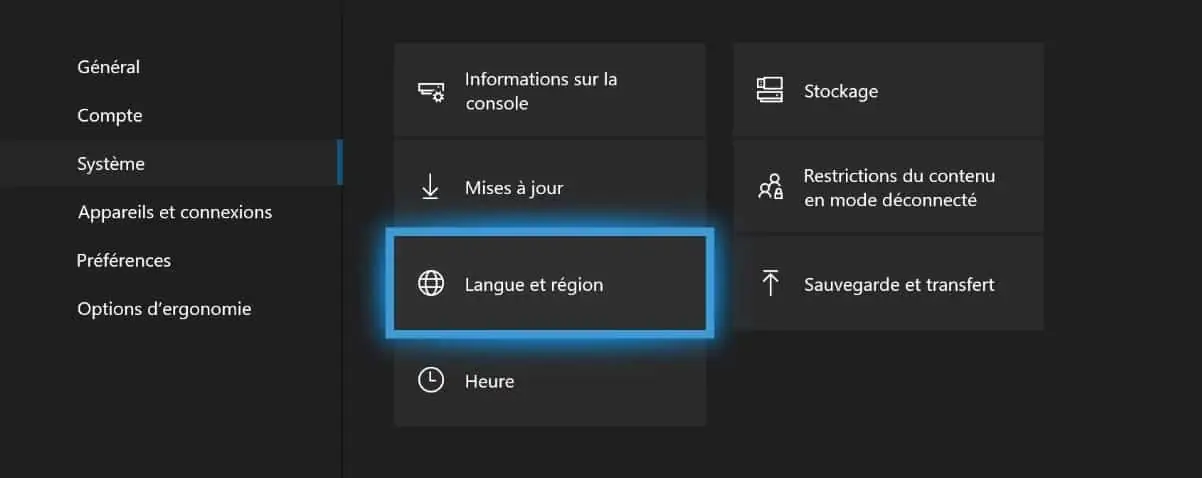
- Change Region to New Zealand: Access your Xbox settings and navigate to the “System” tab. Under “Language & Location,” choose “New Zealand” as your location. This time zone magic will be the key to early access.
Step 3: Restart Your Xbox Console
After adjusting your settings, restart your Xbox console. This step is essential to ensure your changes take effect.
Step 4: Launch EA SPORTS FC 24
Once your console is back up and running, launch EA FC 25. If you’ve followed the previous steps correctly, you should find yourself playing the game ahead of its official release time.
Stay tuned to our pages to ensure you don’t miss any news about EA Sports FC 25. The Canadian studio has already revealed key details about the new gameplay and the updates to the popular Ultimate Team mode.
We’ll also be providing guides to help you kick off your experience in the best possible way, whether in Division Rivals or the Champions Weekend League.
EA Sports FC 25 is available from 27 September on PlayStation 5, Xbox Series X, PlayStation 4, Xbox One, PC, Steam, and Nintendo Switch. Follow us on our social media channels Facebook and Twitter for more news.